Paint.Net笔记(X3) Action 与 HistoryFunction

上一篇介绍了ToolForm的操作机制, 这一篇看一下菜单项的操作.

看ImageMenus.cs会发现如下代码

1
2
3
4
5
6
7
8
9
10
11
12
13
14
15
16
17
18
private void MenuImageCrop_Click(object sender, System.EventArgs e)
{
if (AppWorkspace.ActiveDocumentWorkspace != null)
{
if (!AppWorkspace.ActiveDocumentWorkspace.Selection.IsEmpty)
{
AppWorkspace.ActiveDocumentWorkspace.ExecuteFunction(new CropToSelectionFunction());
}
}
}

private void MenuImageResize_Click(object sender, System.EventArgs e)
{
if (AppWorkspace.ActiveDocumentWorkspace != null)
{
AppWorkspace.ActiveDocumentWorkspace.PerformAction(new ResizeAction());
}
}

有些菜单项是ExecuteFunction, 有些菜单项是PerformAction. 各种Action和Function如下图所示
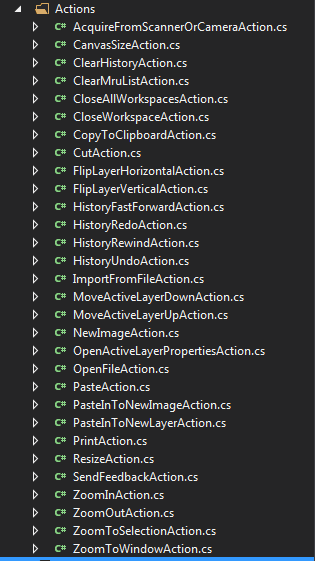
)
)
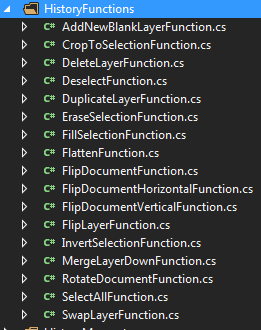
ResizeAction继承DocumentWorkspaceAction, CropToSelectionFunction继承HistoryFunctiont

另外AppWorkspace也能执行Action

1
2
3
4
private void MenuFileOpen_Click(object sender, System.EventArgs e)
{
AppWorkspace.PerformAction(new OpenFileAction());
}

OpenFileAction继承AppWorkspaceAction, 另外有些Action不继承其他类.

它们之间的区别是什么?

DocumentWorkspaceAction与AppWorkspaceAction的区别, 一个是作用的对象不同, 另一个是DocumentWorkspaceAction还能够撤销(命令模式+备忘录模式). 如下所示

1
2
3
4
5
6
7
8
9
10
11
12
13
14
15
16
17
18
19
20
21
22
23
24
25
26
27
28
29
30
31
32
33
34
35
36
37
38
39
40
41
42
43
44
45
46
47
48
49
50
51
   internal abstract class AppWorkspaceAction
{
public abstract void PerformAction(AppWorkspace appWorkspace);

public AppWorkspaceAction()
{
SystemLayer.Tracing.LogFeature("AWAction(" + GetType().Name + ")");
}
}


/// <summary>
/// Provides a way to do a tool-less action that operates on the DocumentWorkspace.
/// DocumentActions must NOT touch directly the History -- they should return history
/// actions that can undo what they have already done. These history actions will
/// then be placed in to the history by whomever invoked the DocumentAction.
/// If the action does not affect the Document, it should return null from its
/// PerformAction method.
/// DocumentActions should ONLY mutate the DocumentWorkspace and any contained
/// objects.
/// </summary>
internal abstract class DocumentWorkspaceAction
{
private ActionFlags actionFlags;
public ActionFlags ActionFlags
{
get
{
return this.actionFlags;
}
}

/// <summary>
/// Implement this to provide an action. You must return a HistoryMemento so that you
/// can be undone. However, you should return null if you didn't do anything that
/// affected the document.
/// </summary>
/// <returns>A HistoryMemento object that will be placed onto the HistoryStack.</returns>
public abstract HistoryMemento PerformAction(DocumentWorkspace documentWorkspace);

/// <summary>
/// Initializes an instance of a class dervied from DocumentAction.
/// </summary>
/// <param name="documentWorkspace">The DocumentWorkspace to interact with.</param>
/// <param name="actionFlags">Flags that describe action behavior or requirements.</param>
public DocumentWorkspaceAction(ActionFlags actionFlags)
{
this.actionFlags = actionFlags;
SystemLayer.Tracing.LogFeature("DWAction(" + GetType().Name + ")");
}
}

那HistoryFunction呢? HistoryFunction与DocumentWorkspaceAction有什么不同

1
2
public HistoryMemento Execute(IHistoryWorkspace historyWorkspace);
public abstract HistoryMemento OnExecute(IHistoryWorkspace historyWorkspace);

从前面2张图片对比, 从名称上看, HistoryFunction貌似更多在和layer和selection打交道.